What Is Project Management Software and When Businesses Need It
Opening: The Cost of Chaos
Most businesses aren’t missing deadlines because their teams lack skill. They’re missing deadlines because critical tasks live in email inboxes, budgets exist in spreadsheets no one can access, and the only person who knows where a project actually stands is the project manager—assuming they remembered to update their notes.
This scenario plays out in thousands of organizations weekly. In fact, research shows that 77% of companies still manage projects using spreadsheets, email threads, and informal communication channels. Those same organizations report missing deadlines 3x more frequently than their better-organized counterparts. The irony is that solving this problem doesn’t require hiring more people. It requires the right tool.
Project management software has moved from a luxury for Fortune 500 companies to a practical necessity for any organization coordinating multiple people around shared goals. The global market for these tools has grown to $8.1 billion in 2026 and is projected to reach $13.1 billion by 2033. This acceleration isn’t driven by vendor marketing—it’s driven by teams that adopt the software genuinely working faster and delivering better results.
This guide explains what project management software actually does, why certain organizations genuinely need it (and why some don’t), and how to assess whether it’s the right investment for your situation.
What Project Management Software Actually Does
At its simplest, project management software centralizes the information about work. Instead of project details scattered across email, Slack messages, phone calls, and someone’s private spreadsheet, everything lives in one place where anyone with permission can see what needs to happen, who’s responsible for it, and when it’s due.
But reducing chaos is just the foundation. The better tools do several things simultaneously:
They make work visible. Before adoption, most teams lack genuine visibility into what’s happening across all active projects. A manager might know their direct report is busy, but busy with what? On which project? And is it on track? Project management software answers these questions in seconds through dashboards and real-time status updates. When work is visible, bottlenecks become obvious, and resource conflicts surface before they cause delays.
They enforce accountability without being punitive. When tasks are assigned in a system rather than mentioned in a meeting, ownership becomes clear. People know what they’re accountable for, and managers know who should have completed what by when. This clarity tends to increase both motivation and follow-through—not through surveillance, but through clarity.
They create a record of decisions and changes. Projects rarely execute exactly as planned. Scope expands, priorities shift, constraints emerge. In organizations without these tools, nobody documents these changes consistently. By the time a project finishes, stakeholders disagree about what was actually delivered versus what was promised. Project management software creates an audit trail. When a requirement changed, the software shows when, why, and who approved it.
They enable data-driven decisions. Spreadsheet-based tracking requires someone to manually compile information before discussing it. That information is often stale by the time it reaches decision-makers. Modern project management software generates live dashboards showing budget spend, schedule variance, resource utilization, and project health status. Managers make decisions based on current data rather than yesterday’s email.
They reduce the time spent on administrative overhead. A significant portion of project coordination is repetitive: sending status updates, tracking who’s finished their tasks, chasing for missing information, rescheduling meetings because deadlines changed. Good software automates these tasks. A status report that previously took a manager an hour to compile might now be generated in seconds.
The Real Costs of Not Having It

Impact of Project Management Software on Key Business Metrics – perplexity
Understanding when you need project management software requires understanding the specific costs of not having it.
The schedule cost is the most visible. When 77% of organizations still rely on spreadsheets and informal communication, they experience measurable delays. Research from PricewaterhouseCoopers found that implementing project management software reduced project timelines by 30%. That’s not incremental—that’s transformational. On a typical project that takes six months, that’s equivalent to finishing one month earlier. Multiplied across several concurrent projects, that’s weeks or months of cumulative time saved annually.
The budget cost is equally real but less obvious. When a project goes over budget, the cause is frequently poor visibility into spending or resource allocation. A team might discover halfway through that they’ve depleted 80% of the budget with only 50% of work complete. Without data to show where the money went, managers scramble to cut scope, extend timelines, or both. Project management software provides real-time spending dashboards and forecasting. A manager can see that the current burn rate will exceed budget in three weeks and adjust course before crisis hits.
What many companies underestimate is the employee cost of coordination chaos. If team members spend significant time in status update meetings, chasing information via email, or searching for the latest project documents, that’s time not spent on actual work. One 30-person organization might lose hundreds of hours annually to coordination overhead that a proper system could cut by half.
The quality cost is perhaps the most damaging. When visibility is poor, mistakes and rework go unnoticed until late stages. A developer might discover that requirements changed weeks ago and nobody informed them. A designer might complete work that was already reassigned. These aren’t failures of competence—they’re failures of communication infrastructure. The cost isn’t just the rework time; it’s the demoralization of executing work that wasn’t needed.
There’s also a real cost to growing chaos. As organizations scale from 5 people to 20 to 50, informal communication breaks down. What worked when everyone sat in the same room becomes impossible. Without a deliberate tool adoption, teams either plateau (can’t scale beyond communication’s breaking point) or create their own messy workarounds. Many organizations in this phase hire more coordinators or administrators to manage spreadsheets and emails, which compounds costs rather than solving the problem.
In practice, organizations that adopt project management software don’t usually do so because a CEO read about best practices. They do it because they hit a painful threshold: too many projects, too many team members, too many missed dates, or too much money wasted on rework.
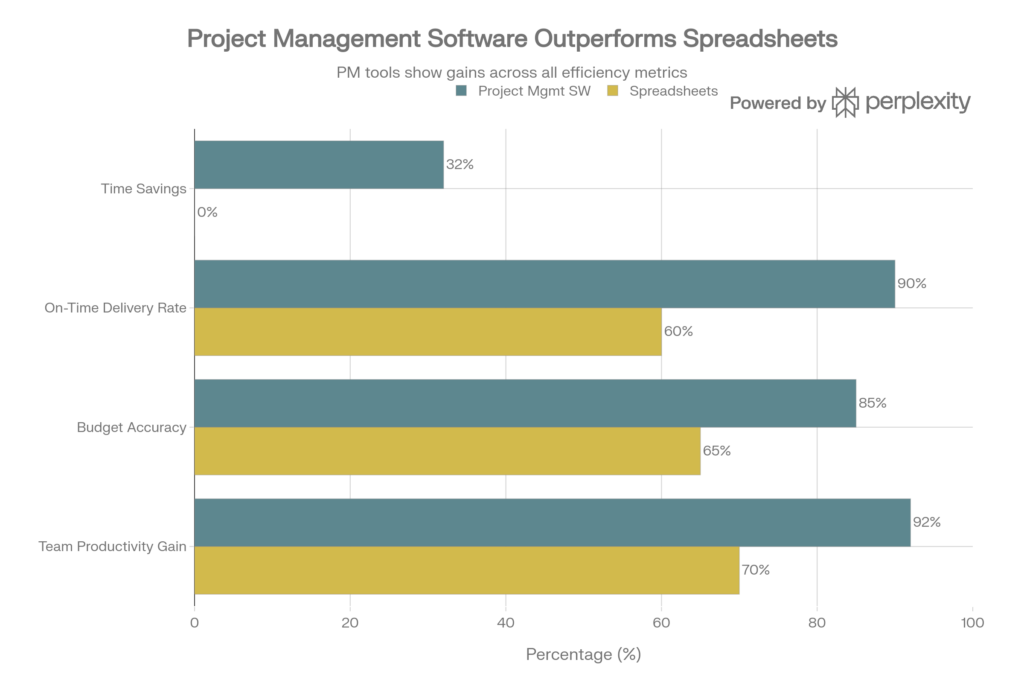
Impact of Project Management Software on Key Business Metrics – perplexity
When Businesses Actually Need Project Management Software
The decision to implement project management software doesn’t have a precise threshold, but certain conditions make it clearly necessary:
You manage more than one concurrent project with multiple people. This is the core scenario. If you’re a solo practitioner or one person managing one sequential project at a time, you might not need it. The moment you have two or three projects running simultaneously with different team members, different deadlines, and different stakeholders, coordination becomes difficult without a centralized system. Spreadsheets start failing because information gets overwritten, versions proliferate, and nobody knows which file is current.
Your team is distributed or hybrid. When everyone sat in an office, you could walk to someone’s desk and check on status. Remote work eliminated that. Teams working across time zones, geographic locations, or even just different buildings need a system that replaces that walk-around visibility. Email and Slack conversations create noise without clarity. Project management software becomes the central nervous system for distributed teams. Cloud-based solutions now capture 56.6% of the market share, driven almost entirely by remote work adoption.
You have budget constraints that matter. Most projects operate with some budget limit. Exceeding it has real consequences. If your projects have meaningful budgets and you’re currently tracking spending in spreadsheets or, worse, discovering overages months into execution, you need better visibility. Project management software with budget tracking and forecasting typically pays for itself within months through reduced overruns. Organizations report saving 20–30% on project costs after adoption through better resource allocation and earlier identification of problems.
You’re losing talent because of disorganization. This is the subtle cost many organizations overlook. Good people leave disorganized environments. If your teams feel like they’re constantly chasing information, constantly reworking decisions that were already made, or never quite sure what they’re supposed to be doing, you’re losing retention. Conversely, teams equipped with proper tools report higher job satisfaction and lower turnover.
You’re stuck in spreadsheet hell and it’s slowing hiring. Once you’ve scaled to a certain point, onboarding new team members onto a spreadsheet-based workflow is inefficient. You spend hours explaining how different tabs interconnect, which files are current, and where to find information. With project management software, new hires log in and immediately see the landscape. This might seem minor, but it compounds—ramp time becomes 2 weeks instead of 6 weeks.
You have clients who demand visibility. Service firms, agencies, and professional services organizations often face pressure from clients to demonstrate progress and control over spending. Sending clients manual status updates feels dated; providing access to a live dashboard demonstrates professionalism and control. Many agencies adopted project management software not because their internal teams demanded it, but because clients expected it.
Practically speaking, research shows that 77% of high-performing organizations use project management software, while only 23% of organizations overall do. That gap suggests there’s still significant adoption runway—and that your competitors using these tools likely have an operational advantage.
When You Probably Shouldn’t Buy It (Yet)
There are legitimate scenarios where project management software isn’t the right fit.
You have one simple, linear project with 2–3 people. If you’re managing a straightforward project with limited personnel and a clear sequence of steps, the overhead of implementing software might exceed the benefit. A shared document and weekly check-in might suffice. But recognize this stage is temporary—the moment you add even one more concurrent project or scale the team, this calculus changes quickly.
Your organization is completely hostile to process change. Project management software only works if people actually use it. If your leadership or team strongly resists adopting new workflows, the software will become digital shelf-ware. You’ll enter tasks, but people won’t check it. You’ll send notifications, but people won’t read them. Before buying, ensure you have buy-in from both leadership (to allocate time for implementation) and the teams (to actually change how they work).
You have immediate cash flow constraints and zero wiggle room. Most project management software costs $10–30 per user monthly for cloud-based options. If your organization is genuinely in survival mode with zero budget flexibility, it’s worth improving processes first with free tools or very low-cost options. But recognize that delaying a solution has a cost too—you’re paying for it through inefficiency and delays.
Your work is inherently unpredictable and process-averse. Some creative or research-intensive organizations genuinely operate on principles that resist rigid workflow structures. That’s unusual but real. If your culture would rebel against task lists and dependency tracking, introducing software before cultural alignment will fail. This is a change management problem, not a tool problem.
For most other scenarios, particularly as organizations scale, the benefits outweigh the costs.
Key Features Your Business Should Look For
If you’re evaluating project management software, certain features matter more than others based on your needs. Most quality tools include these fundamentals:
Task management with clear ownership and due dates. Every task should have an owner, a due date, and a status. Sounds simple, but this foundational feature is what prevents work from slipping through cracks. Look for tools that support subtasks (breaking work into smaller pieces), dependencies (marking that task B can’t start until task A completes), and clear priorities.
Multiple views of the same data. Different people need different views. A project manager might want a Gantt chart showing timelines and resource allocation. A team member might want a simple checklist or Kanban board showing their assigned tasks. A client might want a high-level dashboard showing overall progress. Tools that offer Gantt charts, Kanban boards, list views, and calendar views let people work the way they think.
Resource and capacity planning. Many software teams and service firms have scarce resources—maybe five people who are partially allocated to multiple projects. Without visibility into allocation, you overload key people and leave others idle. Good tools show who’s allocated to what percentage of each project, flag over-allocation, and help balance workloads.
Real-time reporting and dashboards. You should be able to see project status at a glance without manually compiling data. How much budget remains? How many tasks are overdue? What’s the current schedule variance? These should be visible live, not something you calculate in a spreadsheet.
Collaboration and communication features. Task management is only half the story. You need built-in commenting, @mentions, and ideally integration with communication tools like Slack. This keeps conversations attached to work rather than scattered across email.
Time tracking and expense management. If your organization bills by the hour or needs to understand where time actually goes, time tracking is essential. It also provides data for better estimating future projects.
Integration with tools you already use. Your software doesn’t exist in isolation. It needs to connect with email, calendar, file storage, CRM, or communication platforms you already depend on. Integration depth varies significantly between tools, so evaluate this carefully.
Simple user interface. Adoption depends on people actually using the tool. A complex interface buried under advanced features will have poor adoption. Look for clean design, logical workflows, and tools that reduce click count to complete common tasks.
Comparison: Spreadsheets vs. Project Management Software
To understand the shift from traditional tracking to software solutions, consider this practical comparison:
Organizations transitioning from spreadsheets consistently report that the shift pays for itself within 6–12 months through time savings alone. Beyond that, benefits accumulate in the form of fewer missed deadlines, reduced rework, and improved decision-making.
Industry-Specific Adoption Patterns
Project management software isn’t equally deployed across industries. Understanding adoption patterns in your sector provides context:
Software development and technology teams lead adoption at 80–86%, driven by Agile methodologies. Jira remains the dominant tool in this space, though dozens of alternatives serve this market.
Healthcare organizations are at 50%+ adoption, often using hybrid approaches that combine Agile and traditional waterfall methods. Regulatory compliance and precision requirements drive demand for audit trails and formal change control.
Financial services mirror healthcare adoption at 50%+, motivated by compliance, auditability, and the complexity of managing multiple concurrent regulatory projects.
Marketing teams are rapidly adopting these tools, with 86% planning shifts toward more structured project approaches. The driver is managing campaigns, digital projects, and cross-functional initiatives with compressed timelines.
Construction and engineering firms use specialized project management software heavily, with tools designed around site management, subcontractor coordination, and permit tracking.
If your industry lags behind these adoption rates, it might indicate either genuine unsuitability or a missed opportunity. Evaluate which it is for your specific business.
The ROI Question: Does It Pay for Itself?
A typical business purchase decision requires ROI justification. For project management software, the return is real but somewhat counterintuitive—the largest ROI often comes not from the software itself, but from changes in how your organization works.
Tangible benefits you can measure:
- Time savings: If project managers currently spend five hours weekly on status compilation and reporting, and software reduces that to 30 minutes, that’s 18 hours monthly. For a $50/hour PM, that’s $900/month in reclaimed time.
- Reduced project delays: A 30% reduction in timeline translates directly to sooner revenue on software projects or sooner delivery on client work.
- Fewer budget overruns: Better visibility and forecasting prevent cost surprises. If software prevents just one significant overrun per year, the savings exceed annual tool costs.
- Faster onboarding: New team members ramp faster with system-embedded documentation than with manual training.
Intangible benefits (harder to measure but real):
- Improved team morale from reduced coordination chaos
- Better decision-making from real-time data visibility
- Increased retention through reduced frustration
- Improved client relationships through transparency
For a typical small-to-medium business ($5–50 million revenue), project management software for a 10-person team costs roughly $1,500–3,000 annually. The time savings alone typically offset this investment. Most organizations see payback within 3–6 months, with ongoing benefits thereafter.
The calculation is more complex for larger organizations, but the principle holds: once you’re experiencing genuine coordination problems, the cost of not solving them typically exceeds the cost of the software significantly.
Implementation Reality Check
Buying the software doesn’t automatically create benefits. Implementation and adoption matter enormously.
Expect 4–8 weeks of initial setup. Someone needs to map out your project structure, define workflows, configure the tool, and train the team. This isn’t plug-and-play.
Plan for initial resistance. People are comfortable with current workflows, even if they’re inefficient. Expect some resistance to “yet another tool” and plan time for change management.
Start with high-value projects first. Don’t try to migrate your entire portfolio at once. Choose one or two projects where the pain is obvious and stakeholder buy-in is highest. Success here builds momentum for broader adoption.
Allocate time for team training. Your team needs more than documentation—they need hands-on training. This time is worth the investment to avoid the tool becoming “that thing we pay for but don’t use.”
Measure and communicate wins early. Track metrics like on-time delivery rates, budget accuracy, and time spent on administrative overhead. When you can show that a team using the software hit 100% of deadlines while another team using spreadsheets hit 60%, you’ve made the business case for broader adoption.
Frequently Asked Questions
Q: Is project management software worth it for small teams?
A: If your team is smaller than five people on a single simple project, probably not yet. The moment you scale to multiple concurrent projects or cross-functional teams, adoption becomes valuable. Many small businesses start with free or low-cost tiers and upgrade as they grow.
Q: Which tool should we choose?
A: This depends on your specific needs. Software development teams often gravitate toward Jira or Linear. Agencies frequently use Monday.com, Asana, or Wrike. Service firms use Harvest or Kantata. Talk to peers in your industry about what they use and why. Free trials let you test-drive options with real work before committing.
Q: How long does implementation take?
A: Basic implementation for a 10-person team typically takes 4–8 weeks from purchase to productive use. Larger organizations with complex needs might require 3–6 months. The timeline depends on your current process maturity and how much change management is required.
Q: Can we migrate from our current system without losing historical data?
A: Most modern tools support migration, though it requires planning. Your vendor should help you import existing project data. Whether historical data is worth migrating depends on whether you still reference it. In practice, many organizations accept some data loss in exchange for a clean start in a new system.
Q: What if our team doesn’t adopt it?
A: Lack of adoption is a change management failure, not a tool failure. The solution is usually increased support during implementation, more accessible training, and visible leadership commitment. If your organization is genuinely resistant to process improvement, no tool will help—but that’s an organizational problem worth addressing regardless.
Conclusion: Project Management Software as Table Stakes
Project management software has transitioned from luxury to practical necessity for organizations managing multiple concurrent projects across distributed teams. The specific moment when you need it varies—it depends on team size, project complexity, geographic distribution, and organizational maturity.
What’s increasingly clear is that the organizations without it are paying a price through missed deadlines, budget overruns, and coordination chaos. At the same time, those that have implemented it are working faster and delivering better results.
The decision isn’t really about whether to adopt project management software. For any organization with more than one project and more than a handful of people, adoption is inevitable. The only real question is whether you proactively choose the right tool and implementation approach, or whether you reactively scramble to solve coordination problems after they’ve caused real damage.
Editorial Note: This article reflects research into current project management software market trends, adoption statistics, and implementation best practices as of January 2026. The landscape continues to evolve, particularly around AI integration and remote work accommodations. This guide is periodically reviewed and updated to reflect emerging tools and practices.

I am a writer, blogger and maker! I am passionate about technology and new trends in the market.